Veyshot
A browser-based precision game pairing approachable practice with server-verified competition, progressive unlocks, and touch-first play.
- Role
- Product direction, UX design & AI-assisted development
- Year
- 2026
- Project type
- Browser game
- Presentation type
- Case study
Technologies
- JavaScript
- HTML Canvas
- Cloudflare Workers
- Cloudflare D1
- Firebase Authentication
- Node.js
- SQLite
From a quick practice loop to a competitive product
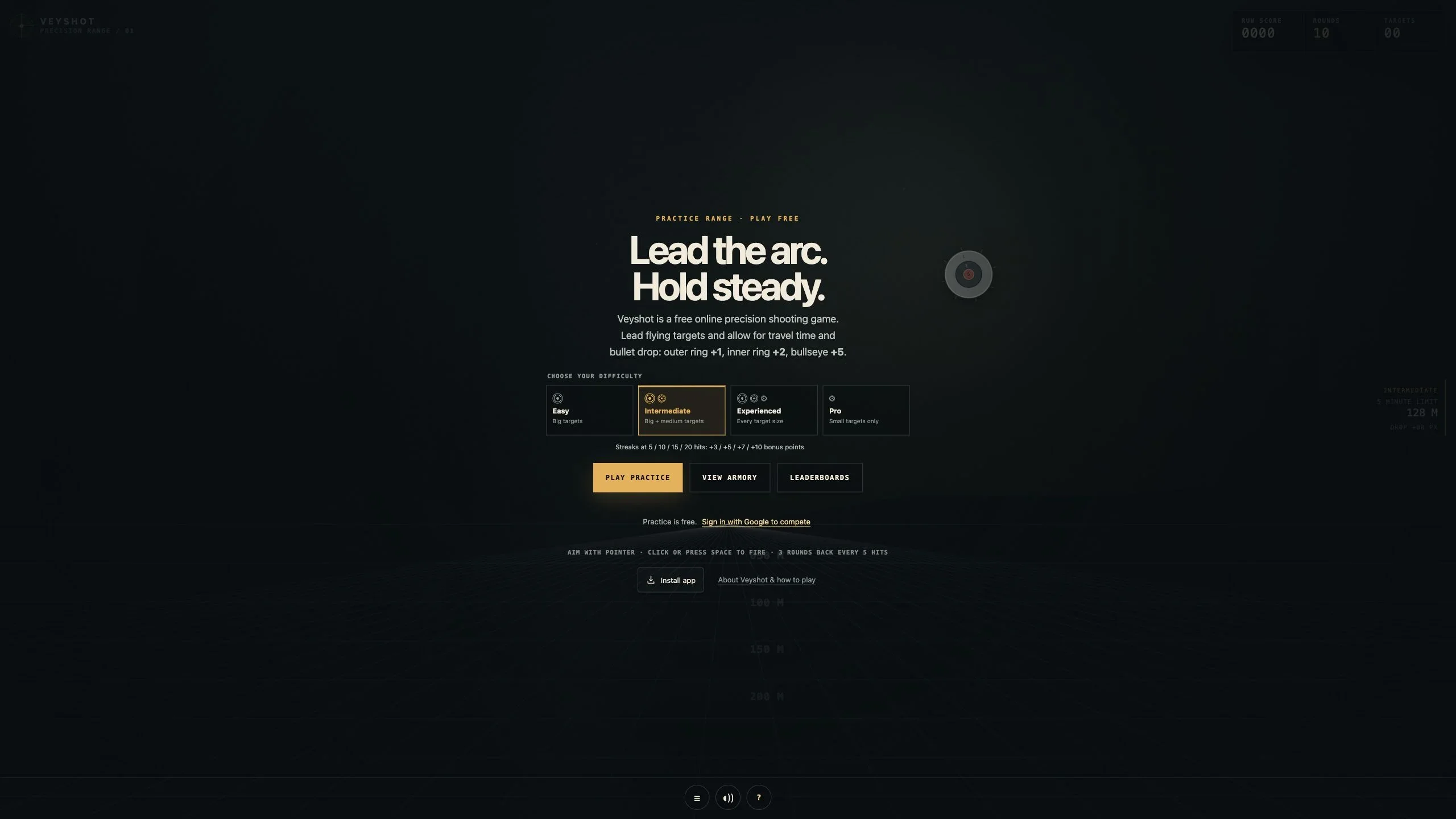
Veyshot is a browser-based precision shooting game built around a simple idea: make the first attempt easy to start, then give players a reason to improve. Moving targets, bullet travel time, and drop turn each shot into a small prediction problem.
Being playable on phones and tablets was a core product requirement. The first attempt should be possible on the device where someone discovers the game.
Players can practice immediately as guests. Signing in with Google adds a persistent profile, Career progression, weapon unlocks, and asynchronous competition through leaderboards. It is score-based competition, not real-time multiplayer.
I led product direction and interaction design through AI-assisted development, reviewing behavior, refining the rules, and testing the experience as the product evolved.
Low friction without making competition superficial
The challenge was to connect a short, approachable game loop with a progression system players could understand and trust. Practice should not require account creation, but competitive scores and unlocks could not depend on values supplied by the browser.
A person might discover Veyshot through a shared link or search result while using a phone or tablet. Telling them to switch to a PC before they can play adds an extra step at the moment they are curious enough to try it. I wanted to remove that device-switching barrier and let discovery lead directly into play.
The experience also needed to work across very different inputs. A desktop pointer is precise; a finger can cover the target. Simply shrinking the desktop interface would not solve aiming, navigation, or the geometry of the playfield.
The product therefore needed three things to work together: clear feedback, meaningful equipment choices, and consistent rules behind every ranked result.
One coherent loop: practice, compare, improve
I organized the experience around the range and a shared Field Desk for the armory, leaderboards, player profiles, and settings. Bringing the armory into that navigation context made it easier to inspect a leaderboard entry, compare equipment, and return without losing the previous view.
The armory contains 20 unlockable weapons with single-, double-, and triple-shot patterns. Comparisons expose handling trade-offs rather than presenting each unlock as an automatic upgrade. Career points connect repeated play to progression, while four difficulty levels give players different challenges.
Onboarding introduces the controls and scoring before the first run. Results distinguish local practice records from verified ranked progress, so a guest result is not mistaken for a competitive unlock.
Play on the device where you discover it
Mobile support needed to mean a genuinely playable game, not just a page that fits a narrow screen. My goal was to preserve the aiming challenge and immediate feedback while making the controls practical for a finger instead of a mouse.
On phones and tablets, players hold, drag to aim, and release to shoot. Desktop players can still aim with the pointer and fire with a click or Space. Pointer cancellation, lost capture, extra touches, and pausing are handled so an interrupted gesture does not accidentally fire.
The canvas preserves circular targets and hit regions across aspect ratios. Ranked runs keep the display geometry issued with their run ticket; resizing fits or pauses the experience instead of silently changing the competitive rules.
Around the game, labeled native selects, visible focus, focus-contained dialogs, and appropriately sized touch controls make navigation more predictable. These are deliberate interface safeguards, not a claim of complete assistive-technology certification.
Verify the run instead of trusting the score
The browser and server share a deterministic JavaScript game engine. A ranked run begins with a server-issued ticket containing its seed, weapon, difficulty, and display geometry. When the run ends, the client submits recorded shot inputs rather than an authoritative score.
The server replays those inputs, validates timing and ticket expiry, and calculates the result before crediting progression. Ownership checks and guarded updates prevent a completed run from being credited twice, including retries. Leaderboards compare verified personal-best runs under the current balance rules.
This makes score tampering harder and keeps scoring consistent, but it is not a guarantee against every bot or form of abuse. Google sign-in provides account identity; it does not prove that each account represents a unique person.
Keep hosting portable and offline behavior honest
The deployed application uses Cloudflare Workers and D1, with Firebase Authentication for Google identity. A separate Node.js server and SQLite adapter exercise the same API and game logic, providing a practical portability path without replacing player identities.
The installable web app caches an explicit set of public assets for offline guest practice. Ranked play, leaderboards, authentication, analytics, and advertising are outside that offline cache. The boundary is intentional: offline practice should work without implying that a competitive result has been saved.
Data export/import tooling and regression tests cover preservation of profiles, run history, and progression. The portable Node path has been tested locally; it is not a claim that every alternative hosting configuration has been deployed or verified.
A shipped game with a foundation for iteration
Veyshot is live at veyshot.com with guest practice, Google sign-in, four difficulties, 20 weapons, Career unlocks, public profiles, and verified leaderboards. Phone and tablet visitors can start in the browser without switching to a computer or installing an app. Installation is optional and adds a standalone presentation with offline guest practice.
Automated coverage exercises deterministic replays, rejected input and timing scenarios, duplicate score submission, progression, leaderboard filters, and data migration. Scripted balance simulations support mechanical comparisons, while real-player fairness and enjoyment still require observation and feedback.
The outcome is a working product that connects interaction design, game rules, identity, and persistent data. The next step is to learn from real play, not to treat shipped features or synthetic tests as evidence of adoption, retention, or revenue.
Trust and continuity belong in the product design
Competitive integrity works best when it is part of the rules from the beginning. A shared simulation makes the relationship between the visible game and the recorded result easier to reason about and test.
Responsive design also means adapting the input model. Touch aiming, cancellation behavior, and stable target geometry mattered as much as spacing and screen size.
Finally, balance changes should not erase a player's history. Separating current standings from retained Career progress allowed the rules to evolve while preserving earned unlocks. That distinction became an important pattern across the game, profiles, and results.
02 / Media study
More screens
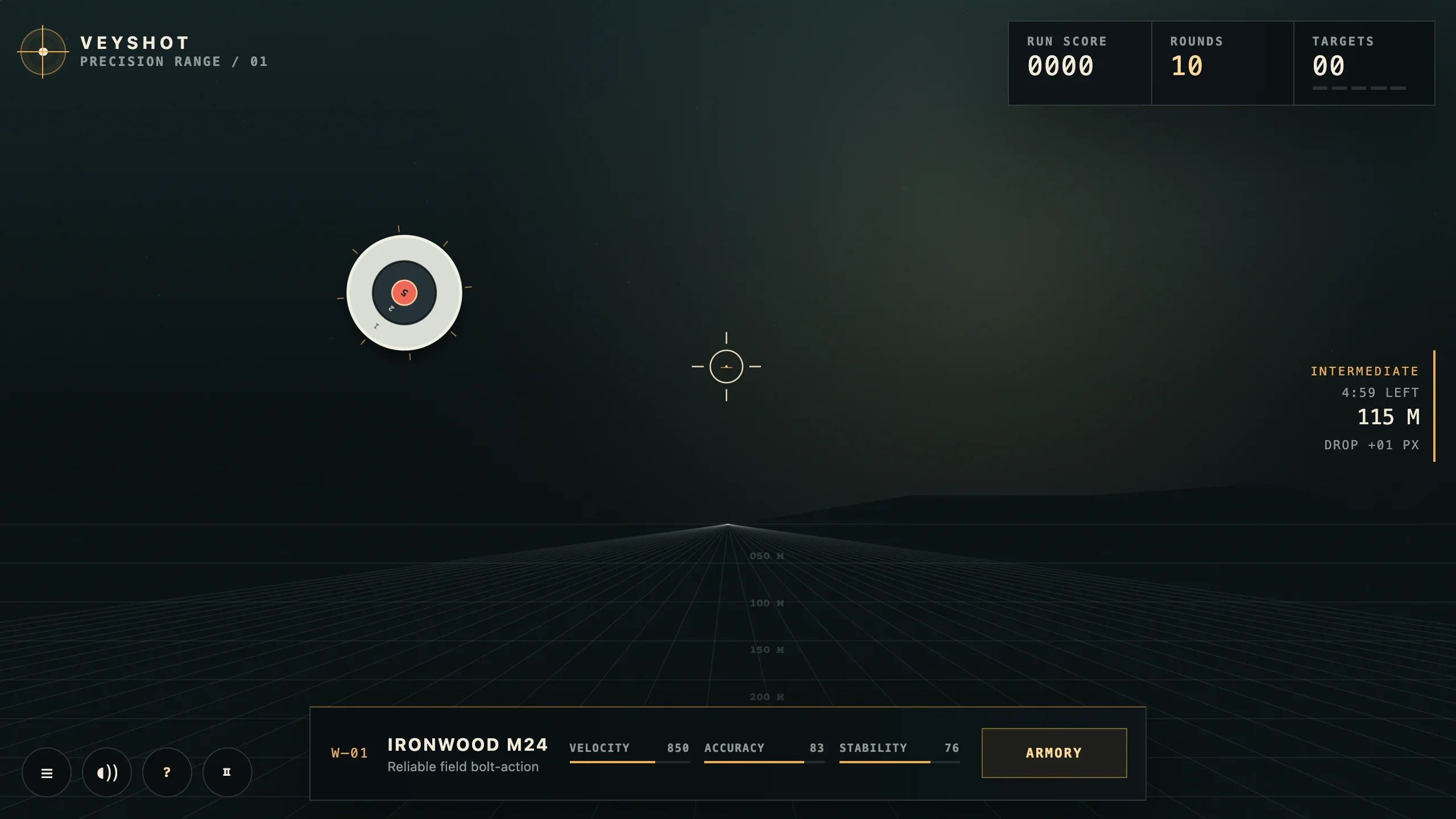
Guest practice in the live game, captured at double pixel density from a 1280 × 720 browser viewport. Moving targets, distance and drop readouts, and weapon statistics stay in view. 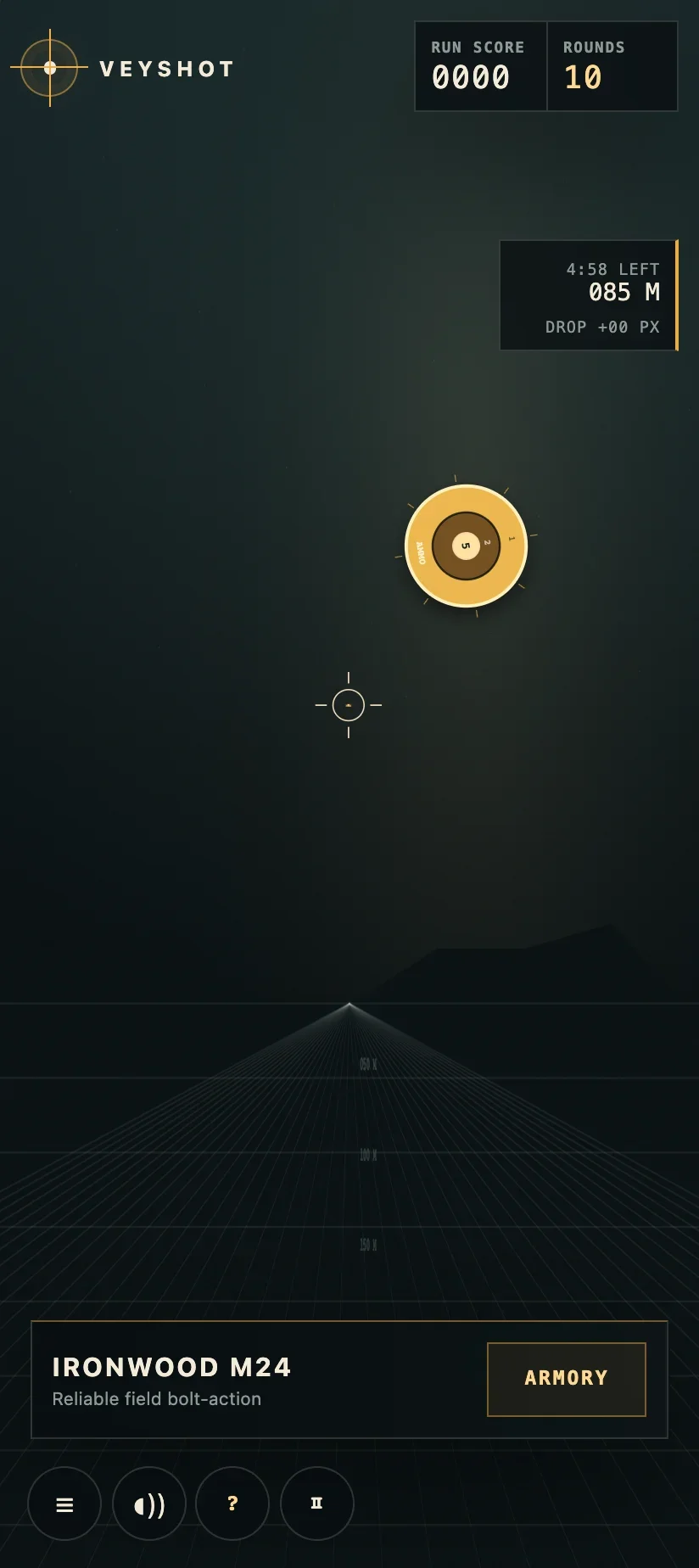
Guest practice in a 412px-wide portrait browser viewport, captured at double pixel density. Touch aiming and compact controls let visitors play without switching to a computer. 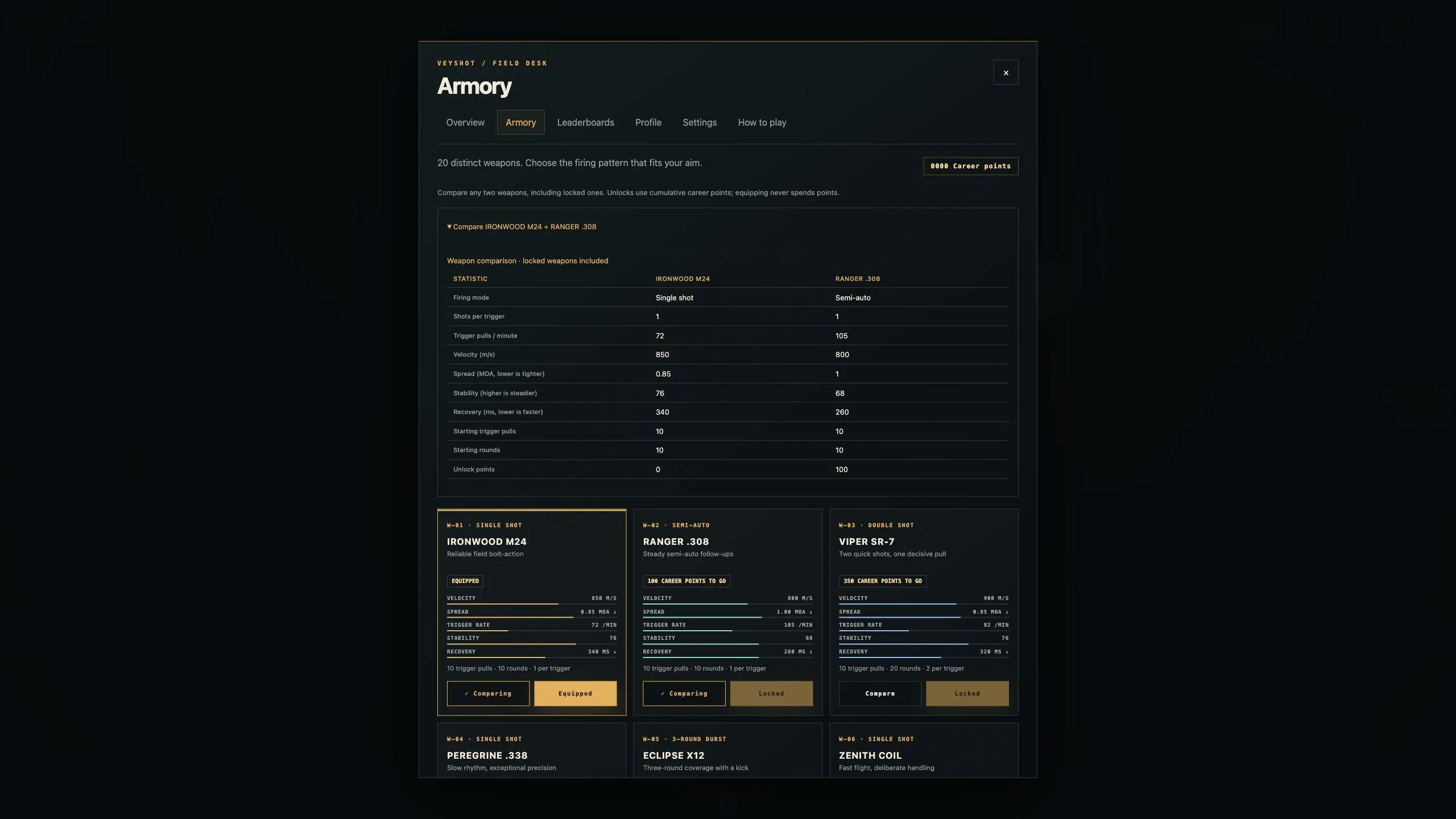
The shared Field Desk keeps equipment and navigation in one place. This 2560 × 1440 capture shows the weapon comparison and wider desktop armory layout.